11. 量子计算
本章介绍计算平台提供的量子线路 GPU 模拟资源,以及集群账号申请、模拟器作业提交方法。
11.1 高性能 GPU 模拟器
主要包括部署在高能所 V100 GPU 集群上的高性能量子线路 GPU 模拟器,如 qiskit GPU 模拟器(qiskit-aer),支持基于 MPI 的多 GPU 并行。
11.2 集群账号与登录
没有高能所集群账号
参考 4.1.1 统一认证账号 节注册高能所统一认证账号,再申请集群 AFS 账号,在 隶属应用 处选择 QC,其余信息根据实际情况填写。
已有高能所集群账号
如已有高能所集群账号,但不属于 QC 用户组,则需按 4.1.3 账号申请添加辅组 申请副组。
具体登录 https://ink.ihep.ac.cn,在 Home → Apply for second linux group → Secondary group apply 处选择 QC 副组。
上述申请经审核通过后,会在集群的 /hpcfs/quantum/ 目录下生成用户目录。
11.3 模拟器作业提交
软件环境
使用 module 管理 MPI 编译器、量子模拟器等软件环境:
module load 可加载对应软件,如 module load quantum/qiskit-2.4.1-aer-gpu 可加载 IBM qiskit 量子编程框架,其通过 qiskit-aer 后端支持高性能 GPU 模拟,并可通过 MPI 进行多 GPU 模拟,以模拟超出单卡显存的量子线路。
Slurm 作业提交
在用 Slurm 调度系统提交量子模拟作业时,partition 需用 gpu,account 需用 qc,qos 需用 qcnormal,一个 Slurm 作业脚本(脚本可以叫 submit.sh)的例子如下:
#!/bin/bash
#SBATCH --partition=gpu
#SBATCH --qos=qcnormal
#SBATCH --account=qc
#SBATCH --job-name=qv
#SBATCH --output=qv.%j.out
#SBATCH --error=qv.%j.err
#SBATCH --nodes=1
#SBATCH --gres=gpu:v100:1
#SBATCH --ntasks=1
#SBATCH --mem=40G

module purge
module use /hpcfs/quantum/modulefiles
module load quantum/qiskit-2.4.1-aer-gpu

export OMP_NUM_THREADS=1

ulimit -s unlimited

echo "Slurm job ID: $SLURM_JOB_ID"
echo "Slurm job partition: $SLURM_JOB_PARTITION"
echo "Slurm job account: $SLURM_JOB_ACCOUNT"
echo "Slurm job nodes: $SLURM_JOB_NODELIST"

python compare_cpu_gpu.py --qubits-min 10 --qubits-max 25
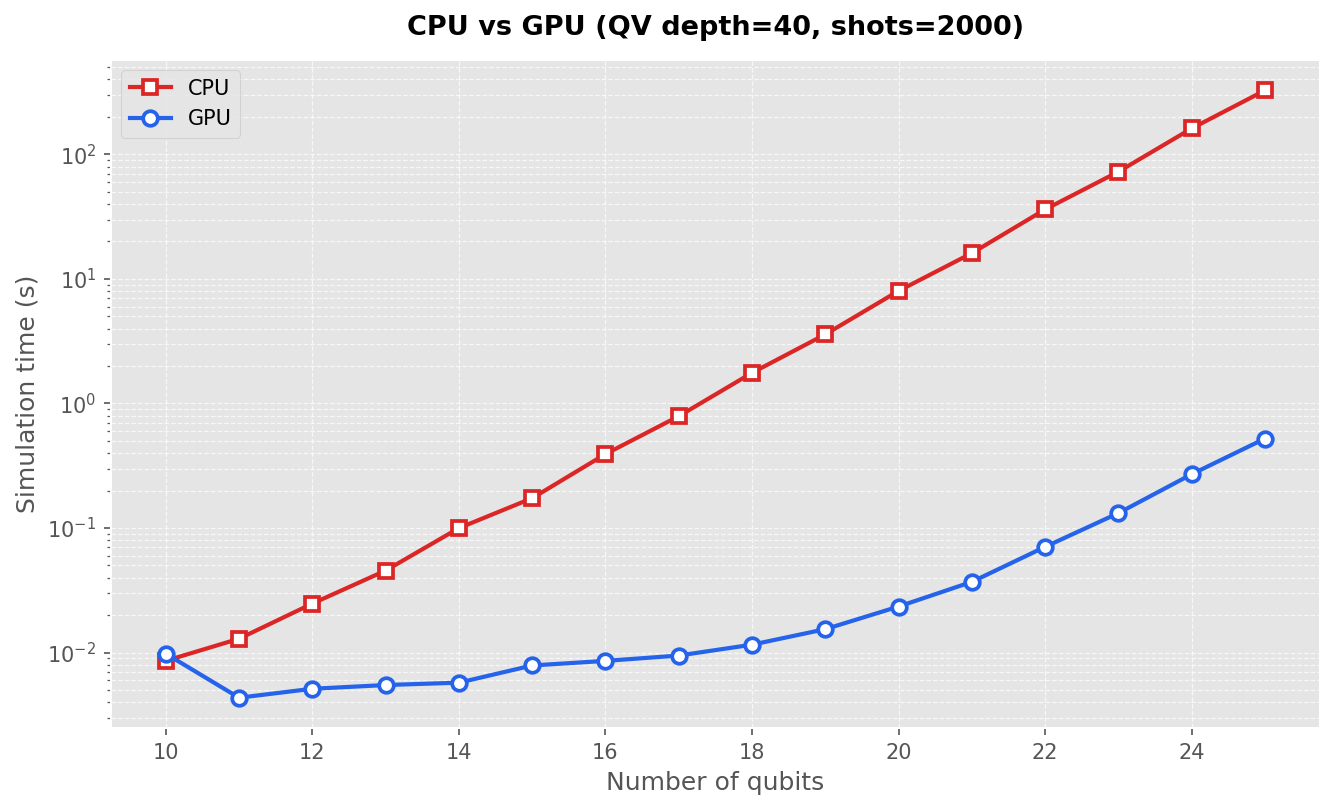
compare_cpu_gpu.py 是测试比较不同比特数时 qiskit 的 QuantumVolume 量子线路在 CPU 及 GPU 上运行时的性能差异,该脚本内容如下:
"""Compare CPU vs Thrust GPU simulation time on Quantum Volume circuits."""

from __future__ import annotations

import argparse

from qiskit import transpile
from qiskit.circuit import QuantumCircuit
from qiskit.circuit.library import quantum_volume
from qiskit_aer import AerSimulator

OUTPUT = "compare_cpu_gpu.png"
SEED = 12345

BACKENDS = (
    ("CPU", " dc2626", "s"),
    ("GPU", " 2563eb", "o"),
)


def make_circuit(qubits: int, depth: int) -> QuantumCircuit:
    circuit = quantum_volume(qubits, depth, seed=0)
    circuit.measure_all()
    return circuit


def run_benchmark(qubits: int, device: str, *, depth: int, shots: int) -> float:
    sim = AerSimulator(method="statevector", device=device)
    circuit = transpile(make_circuit(qubits, depth), sim)
    result = sim.run(circuit, shots=shots, seed_simulator=SEED).result()

    data = result.to_dict()["results"][0]
    if data.get("status") != "DONE":
        raise RuntimeError(f"{device} failed at {qubits} qubits: {data.get('status')}")
    return float(data["time_taken"])


def plot_results(
    qubits_list: list[int],
    timings: dict[str, list[float]],
    *,
    depth: int,
    shots: int,
) -> None:
    import matplotlib.pyplot as plt
    from matplotlib.ticker import MaxNLocator, ScalarFormatter

    plt.style.use("ggplot")
    fig, ax = plt.subplots(figsize=(9, 5.5), dpi=150)
    for device, color, marker in BACKENDS:
        ax.plot(
            qubits_list,
            timings[device],
            label=device,
            color=color,
            marker=marker,
            markersize=7,
            linewidth=2,
            markerfacecolor="white",
            markeredgewidth=1.8,
            markeredgecolor=color,
        )

    ax.set_xlabel("Number of qubits", fontsize=12)
    ax.set_ylabel("Simulation time (s)", fontsize=12)
    ax.set_title(
        f"CPU vs GPU (QV depth={depth}, shots={shots})",
        fontsize=13,
        fontweight="semibold",
        pad=12,
    )
    ax.set_xticks(qubits_list)
    ax.xaxis.set_major_locator(MaxNLocator(integer=True))
    ax.yaxis.set_major_formatter(ScalarFormatter(useMathText=True))
    ax.set_yscale("log")
    ax.legend(frameon=True, fancybox=True, shadow=False, fontsize=10)
    ax.grid(True, which="both", linestyle="--", linewidth=0.6, alpha=0.7)
    fig.tight_layout()
    fig.savefig(OUTPUT, bbox_inches="tight")
    plt.close(fig)


def main() -> None:
    parser = argparse.ArgumentParser(description="Compare CPU vs GPU on QV.")
    parser.add_argument("--qubits-min", type=int, default=20)
    parser.add_argument("--qubits-max", type=int, default=27)
    parser.add_argument("--depth", type=int, default=40)
    parser.add_argument("--shots", type=int, default=2000)
    args = parser.parse_args()

    qubits_list = list(range(args.qubits_min, args.qubits_max + 1))
    timings: dict[str, list[float]] = {device: [] for device, *_ in BACKENDS}

    for qubits in qubits_list:
        for device, *_ in BACKENDS:
            elapsed = run_benchmark(
                qubits, device, depth=args.depth, shots=args.shots
            )
            timings[device].append(elapsed)
            print(f"qubits={qubits:2d}  {device}: {elapsed:.6f} s", flush=True)

    for device, *_ in BACKENDS:
        print(f"{device}: {timings[device]}", flush=True)

    plot_results(qubits_list, timings, depth=args.depth, shots=args.shots)
    print(f"Saved plot: {OUTPUT}", flush=True)


if __name__ == "__main__":
    main()
sbatch submit.sh 可以将任务提交到 GPU 计算节点,使用 squeue -u $USER 可以查看当前用户的作业运行情况。
得到结果如下图所示,可以看到用 GPU 进行量子线路模拟要快许多。
上述脚本位于 /hpcfs/quantum/examples/qiskit 目录,可供参考(qiskit 版本为 2.4.1,qiskit-aer 版本为 0.17.2)。
常见问题(FAQ)
见常见问题。
🤖 AI 助手
💬 快速提问
×
有问题?输入后跳转到对话页继续交流