11. Quantum Computing
11.1 High-Performance GPU Simulator
This section mainly describes high-performance GPU simulators for quantum circuits deployed on the IHEP V100 GPU cluster, such as the Qiskit GPU simulator (qiskit-aer). The simulator supports MPI-based multi-GPU parallelism.
11.2 Cluster Account and Login
11.2.1 Users Without an IHEP Cluster Account
Refer to Section 3.1.1 to register an IHEP unified authentication account, then apply for a cluster AFS account. Select QC in the Affiliated Application field and fill in the other information according to your actual situation.
11.2.2 Users With an Existing IHEP Cluster Account
If you already have an IHEP cluster account but do not belong to the QC user group, apply for a secondary group according to Section 3.1.3.
Log in to https://ink.ihep.ac.cn, then go to Home -> Apply for second linux group -> Secondary group apply and select the QC secondary group.
After the application is approved, a user directory will be created under /hpcfs/quantum/ on the cluster.
11.3 Simulator Job Submission
11.3.1 Software Environment
Use module to manage software environments such as MPI compilers and quantum simulators:
The command above shows available software and versions. Use module load to load the corresponding software. For example, module load quantum/qiskit-2.4.1-aer-gpu loads the IBM Qiskit quantum programming framework. Through the qiskit-aer backend, it supports high-performance GPU simulation and can use MPI for multi-GPU simulation of quantum circuits that exceed the memory of a single GPU.
11.3.2 Submit Slurm Jobs
When submitting quantum simulation jobs through Slurm, use gpu for partition, qc for account, and qcnormal for qos. An example Slurm job script, such as submit.sh, is shown below:
 !/bin/bash
 SBATCH --partition=gpu
 SBATCH --qos=qcnormal
 SBATCH --account=qc
 SBATCH --job-name=qv
 SBATCH --output=qv.%j.out
 SBATCH --error=qv.%j.err
 SBATCH --nodes=1
 SBATCH --gres=gpu:v100:1
 SBATCH --ntasks=1
 SBATCH --mem=40G

module purge
module use /hpcfs/quantum/modulefiles
module load quantum/qiskit-2.4.1-aer-gpu

export OMP_NUM_THREADS=1

ulimit -s unlimited

echo "Slurm job ID: $SLURM_JOB_ID"
echo "Slurm job partition: $SLURM_JOB_PARTITION"
echo "Slurm job account: $SLURM_JOB_ACCOUNT"
echo "Slurm job nodes: $SLURM_JOB_NODELIST"

python compare_cpu_gpu.py --qubits-min 10 --qubits-max 25
compare_cpu_gpu.py compares the performance of Qiskit's QuantumVolume quantum circuit on CPU and GPU for different numbers of qubits. The script is as follows:
"""Compare CPU vs Thrust GPU simulation time on Quantum Volume circuits."""

from __future__ import annotations

import argparse

from qiskit import transpile
from qiskit.circuit import QuantumCircuit
from qiskit.circuit.library import quantum_volume
from qiskit_aer import AerSimulator

OUTPUT = "compare_cpu_gpu.png"
SEED = 12345

BACKENDS = (
    ("CPU", " dc2626", "s"),
    ("GPU", " 2563eb", "o"),
)


def make_circuit(qubits: int, depth: int) -> QuantumCircuit:
    circuit = quantum_volume(qubits, depth, seed=0)
    circuit.measure_all()
    return circuit


def run_benchmark(qubits: int, device: str, *, depth: int, shots: int) -> float:
    sim = AerSimulator(method="statevector", device=device)
    circuit = transpile(make_circuit(qubits, depth), sim)
    result = sim.run(circuit, shots=shots, seed_simulator=SEED).result()

    data = result.to_dict()["results"][0]
    if data.get("status") != "DONE":
        raise RuntimeError(f"{device} failed at {qubits} qubits: {data.get('status')}")
    return float(data["time_taken"])


def plot_results(
    qubits_list: list[int],
    timings: dict[str, list[float]],
    *,
    depth: int,
    shots: int,
) -> None:
    import matplotlib.pyplot as plt
    from matplotlib.ticker import MaxNLocator, ScalarFormatter

    plt.style.use("ggplot")
    fig, ax = plt.subplots(figsize=(9, 5.5), dpi=150)
    for device, color, marker in BACKENDS:
        ax.plot(
            qubits_list,
            timings[device],
            label=device,
            color=color,
            marker=marker,
            markersize=7,
            linewidth=2,
            markerfacecolor="white",
            markeredgewidth=1.8,
            markeredgecolor=color,
        )

    ax.set_xlabel("Number of qubits", fontsize=12)
    ax.set_ylabel("Simulation time (s)", fontsize=12)
    ax.set_title(
        f"CPU vs GPU (QV depth={depth}, shots={shots})",
        fontsize=13,
        fontweight="semibold",
        pad=12,
    )
    ax.set_xticks(qubits_list)
    ax.xaxis.set_major_locator(MaxNLocator(integer=True))
    ax.yaxis.set_major_formatter(ScalarFormatter(useMathText=True))
    ax.set_yscale("log")
    ax.legend(frameon=True, fancybox=True, shadow=False, fontsize=10)
    ax.grid(True, which="both", linestyle="--", linewidth=0.6, alpha=0.7)
    fig.tight_layout()
    fig.savefig(OUTPUT, bbox_inches="tight")
    plt.close(fig)


def main() -> None:
    parser = argparse.ArgumentParser(description="Compare CPU vs GPU on QV.")
    parser.add_argument("--qubits-min", type=int, default=20)
    parser.add_argument("--qubits-max", type=int, default=27)
    parser.add_argument("--depth", type=int, default=40)
    parser.add_argument("--shots", type=int, default=2000)
    args = parser.parse_args()

    qubits_list = list(range(args.qubits_min, args.qubits_max + 1))
    timings: dict[str, list[float]] = {device: [] for device, *_ in BACKENDS}

    for qubits in qubits_list:
        for device, *_ in BACKENDS:
            elapsed = run_benchmark(
                qubits, device, depth=args.depth, shots=args.shots
            )
            timings[device].append(elapsed)
            print(f"qubits={qubits:2d}  {device}: {elapsed:.6f} s", flush=True)

    for device, *_ in BACKENDS:
        print(f"{device}: {timings[device]}", flush=True)

    plot_results(qubits_list, timings, depth=args.depth, shots=args.shots)
    print(f"Saved plot: {OUTPUT}", flush=True)


if __name__ == "__main__":
    main()
Submit the job to a GPU compute node with:
Use the following command to view the current user's jobs:
The result is shown below. GPU-based quantum circuit simulation is significantly faster.
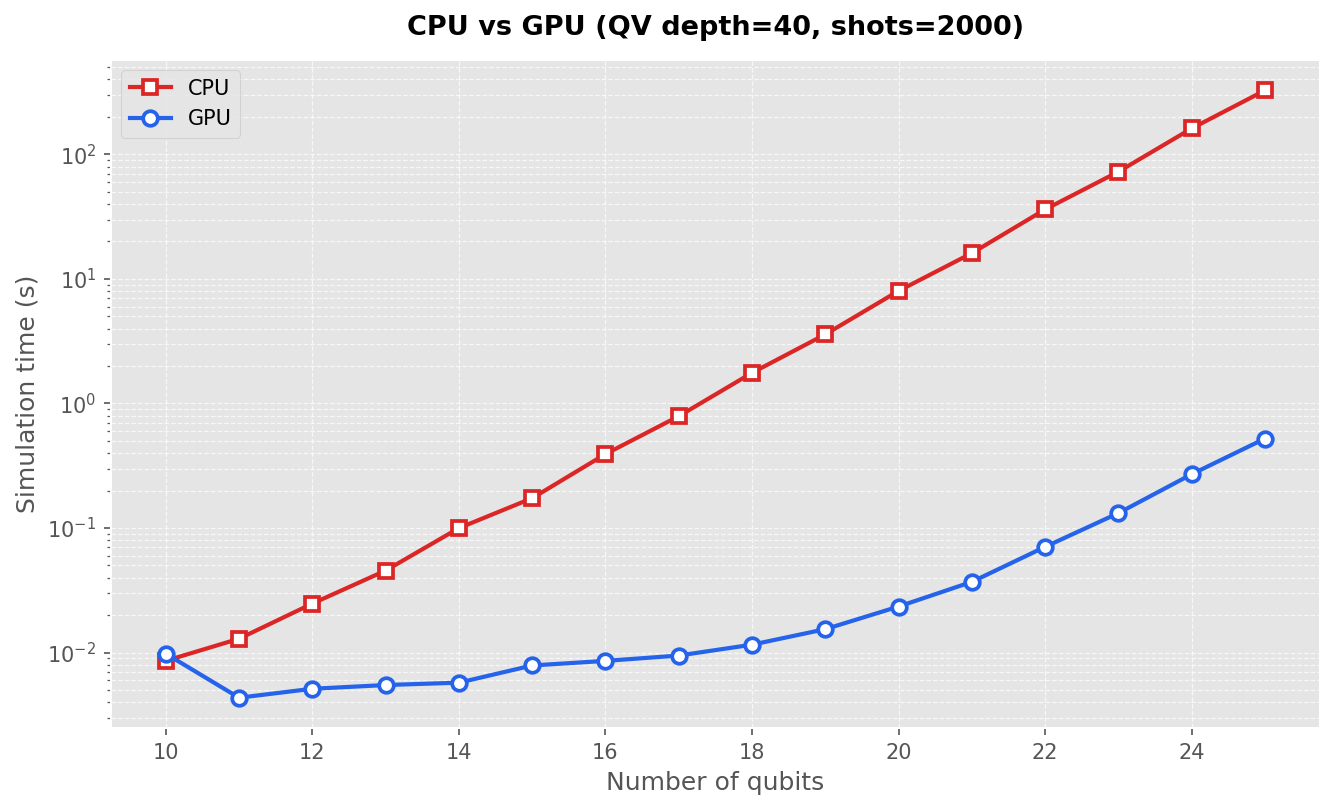
The script above is located in /hpcfs/quantum/examples/qiskit for reference. The Qiskit version is 2.4.1 and the qiskit-aer version is 0.17.2.
有问题?输入后跳转到对话页继续交流