13.2 Software Release
13.2.1 Overview
Software release refers to the process in which experiment software administrators publish software packages required by the computing environment. These packages are used by experiment users when submitting jobs.
The computing center uses CVMFS (CernVM File System) to host software for different experiment groups.
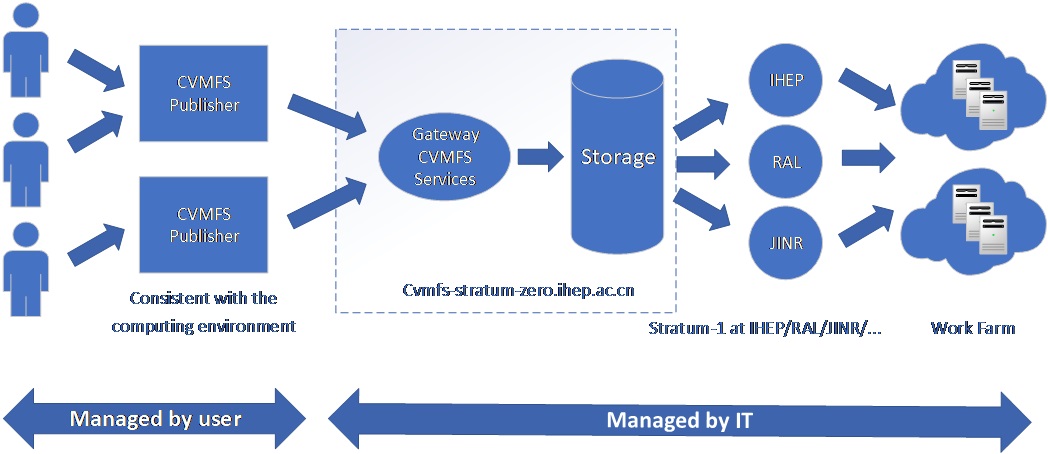
cvmfspublisher.ihep.ac.cn is the dedicated software publishing server. It:
- Only allows login via SSH private key authentication
- Is restricted to system users
- Provides an environment consistent with login nodes
- Does NOT include other network storage systems
This ensures that all compiled software: - Depends only on
/cvmfs- Can run in an environment where only/cvmfsis mounted
13.2.2 Architecture
The software publishing workflow and architecture are shown below:
13.2.3 Software Release Workflow
1. Apply for Publishing Account
The software administrator should:
- Contact the computing center
- Request a publishing account
- Provide:
- Repository name:
$repo - SSH public key
The CVMFS administrator will create the account username.
2. Generate SSH Key Pair
3. Login to Publisher Server
4. Check Repository Status
If the repository is in transaction state, it means another user is modifying it.
Coordinate with others or wait before proceeding.
5. Start Transaction
Notes: Maximum transaction time: 24 hours After expiration, publishing will fail with: token expired
13.2.4 Software Build Methods
There are three common methods for building software in a CVMFS repository:
a. Copy-Based Deployment
The software administrator compiles the software in an independent build environment.
After compilation, the generated artifacts are copied to the publisher server:
/cvmfs/repositoryname/...
b. Native Build on Publisher
The software administrator compiles the software directly on the cvmfspublisher.ihep.ac.cn server.
The compiled output is written directly to:
/cvmfs/repositoryname/...
c. Container-Based Build (OS-dependent, Recommended)
To ensure compatibility with specific operating systems, use the container environment:
Inside the container:Singularity yourimage.sif:~>
Build software into:
/cvmfs/<repo>/dirA
All /cvmfs/*.ihep.ac.cn repositories are accessible
exit
Handling Build Failures
If any error occurs during the build process (e.g., timeout, failure), abort the current transaction:
This will discard all changes made during the current transaction.Then restart:
13.2.5 Publish Software
After completing the build, exit the repository directory and run:
6. List Recent Published Versionscvmfs_server tag -l repositoryname
Name │ Revision │ Channel │ Timestamp │ Branch │ Description
─────────────────────────────┼──────────┼─────────┼──────────────────────┼────────┼─────────────
trunk-previous │ 1 │ trunk │ 13 Jul 2020 14:19:08 │ │ default undo target
generic-2020-07-13T06:19:07Z │ 1 │ trunk │ 13 Jul 2020 14:19:08 │ │
trunk │ 2 │ trunk │ 13 Jul 2020 15:40:53 │ │ current HEAD
origin │ 2 │ trunk │ 13 Jul 2020 15:40:53 │ │ create
─────────────────────────────┴──────────┴─────────┴──────────────────────┴────────┴─────────────
listing contains 4 tags
7. Availability
Newly published software becomes available in ~10 minutes
8. Common Issues
Issue 1: Open File Handles Prevent Publishing
Check processes: Inspect: Kill process: Retry:Software Access Workflow
Users access software via CVMFS client.
1.Install CVMFS Client
yum -y install https://ecsft.cern.ch/dist/cvmfs/cvmfs-release/cvmfs-release-latest.noarch.rpm
yum -y install cvmfs cvmfs-config-default
cvmfs_config setup
2. Configure /etc/cvmfs/default.local

 1. Install CVMFS Client
yum -y install https://ecsft.cern.ch/dist/cvmfs/cvmfs-release/cvmfs-release-latest.noarch.rpm
yum -y install cvmfs cvmfs-config-default
cvmfs_config setup
CVMFS_REPOSITORIES=bes3.ihep.ac.cn,common.ihep.ac.cn,cvmfs-config.cern.ch
CVMFS_CACHE_BASE=/scratch/cvmfs
CVMFS_QUOTA_LIMIT=40960
CVMFS_HTTP_PROXY=DIRECT
  OR
CVMFS_HTTP_PROXY="http://proxyIP:3128"
curl -o /etc/cvmfs/domain.d/cern.ch.local \
http://cvmfs-stratum-one.ihep.ac.cn/cvmfs/software/client_configure/cern.ch.local

ln -s /etc/cvmfs/domain.d/cern.ch.local /etc/cvmfs/domain.d/egi.eu.local
ln -s /etc/cvmfs/domain.d/cern.ch.local /etc/cvmfs/domain.d/opensciencegrid.org.local
5. Configure IHEP Domain and Keys
bash
mkdir -p /etc/cvmfs/keys/ihep.ac.cn

curl -o /etc/cvmfs/keys/ihep.ac.cn/ihep.ac.cn.pub \
http://cvmfs-stratum-one.ihep.ac.cn/cvmfs/software/client_configure/ihep.ac.cn/ihep.ac.cn.pub

curl -o /etc/cvmfs/domain.d/ihep.ac.cn.conf \
http://cvmfs-stratum-one.ihep.ac.cn/cvmfs/software/client_configure/ihep.ac.cn.conf
6. Verify Installation
bash
cvmfs_config probe
One-Click Install Script
Save the following as install_cvmfs_client.sh and run as root:
#!/bin/bash
# === CVMFS client one-click install script (IHEP) ===
# For RHEL/CentOS, requires root privileges
# Usage: sudo bash install_cvmfs_client.sh

set -e

echo "====[1/7] Install CVMFS packages ===="
yum -y install https://ecsft.cern.ch/dist/cvmfs/cvmfs-release/cvmfs-release-latest.noarch.rpm
yum -y install cvmfs cvmfs-config-default
cvmfs_config setup

echo "====[2/7] Configure default.local ===="
cat > /etc/cvmfs/default.local <<'EOF'
CVMFS_REPOSITORIES=bes3.ihep.ac.cn,common.ihep.ac.cn,cvmfs-config.cern.ch
CVMFS_CACHE_BASE=/scratch/cvmfs
CVMFS_QUOTA_LIMIT=40960
CVMFS_HTTP_PROXY=DIRECT
EOF

echo "====[3/7] Disable SELinux enforce ===="
setenforce 0

echo "====[4/7] Configure Stratum server ===="
curl -o /etc/cvmfs/domain.d/cern.ch.local http://cvmfs-stratum-one.ihep.ac.cn/cvmfs/software/client_configure/cern.ch.local
ln -sf /etc/cvmfs/domain.d/cern.ch.local /etc/cvmfs/domain.d/egi.eu.local
ln -sf /etc/cvmfs/domain.d/cern.ch.local /etc/cvmfs/domain.d/opensciencegrid.org.local

echo "====[5/7] Configure IHEP domain and keys ===="
mkdir -p /etc/cvmfs/keys/ihep.ac.cn
curl -o /etc/cvmfs/keys/ihep.ac.cn/ihep.ac.cn.pub http://cvmfs-stratum-one.ihep.ac.cn/cvmfs/software/client_configure/ihep.ac.cn/ihep.ac.cn.pub
curl -o /etc/cvmfs/domain.d/ihep.ac.cn.conf http://cvmfs-stratum-one.ihep.ac.cn/cvmfs/software/client_configure/ihep.ac.cn.conf

echo "====[6/7] Verify CVMFS client ===="
cvmfs_config probe

echo "====[7/7] Done ===="
echo "CVMFS client installed. Access software under /cvmfs."
Note: To use a proxy, modify
CVMFS_HTTP_PROXYin/etc/cvmfs/default.local, e.g.:
有问题?输入后跳转到对话页继续交流